29 September 2017
Dynamics 365 operations default elements / Object XML files storage place
C:\AOSService\PackagesLocalDirectory\ApplicationPlatform\ApplicationPlatform
C:\AOSService\PackagesLocalDirectory\ApplicationFoundation\ApplicationFoundation\

28 September 2017
AX 2012 lookup filter using query
public void lookup()
{
QueryBuildDataSource qbds;
Query query = new Query();
LanguageId language;
SysTableLookup sysTableLookup = SysTableLookup::newParameters(tableNum(EcoResProductTranslation), this);
sysTableLookup.addLookupfield(fieldNum(EcoResProductTranslation, Name));
qbds = query.addDataSource(tableNum(EcoResProductTranslation));
language = CompanyInfo::find().LanguageId;
qbds.addRange(fieldNum(EcoResProductTranslation, LanguageId)).value(queryValue(language));
qbds = qbds.addDataSource(tableNum(EcoResProduct));
qbds.joinMode(JoinMode::InnerJoin);
qbds.relations(True);
sysTableLookup.parmQuery(query);
sysTableLookup.performFormLookup();
}
{
QueryBuildDataSource qbds;
Query query = new Query();
LanguageId language;
SysTableLookup sysTableLookup = SysTableLookup::newParameters(tableNum(EcoResProductTranslation), this);
sysTableLookup.addLookupfield(fieldNum(EcoResProductTranslation, Name));
qbds = query.addDataSource(tableNum(EcoResProductTranslation));
language = CompanyInfo::find().LanguageId;
qbds.addRange(fieldNum(EcoResProductTranslation, LanguageId)).value(queryValue(language));
qbds = qbds.addDataSource(tableNum(EcoResProduct));
qbds.joinMode(JoinMode::InnerJoin);
qbds.relations(True);
sysTableLookup.parmQuery(query);
sysTableLookup.performFormLookup();
}
28 August 2017
Dynamics AX caching / Cache lookup in AX 2012
Cache Lookup In AX 2012
Single record caching
Found
Found caching will assign for the main table, to find the unique record, like CustTable.
Found and Empty
Similar to Found, when there is empty record can be cache, will be used for Group Tables like custGroup.
NotInTTS
Will be used for Transaction tables like CustTrans, because to avoid to cache the NotInTTS records.
Set-based caching
EntairTable
This will be used mainly for Parameter table as it contains the single record to cache full table data.
Record Caching
Microsoft Dynamics AX database record caching is a performance-enhancing feature that helps avoid database access when it's not strictly necessary. Retrieving database records from memory instead of the database significantly speeds up data access. Caching can reduce the performance penalty for repetitively accessing the same database records.
Types of Caching
Caching is transparent to the application; however, it's important to know how caching works to optimize its performance in Microsoft Dynamics AX. Following are the types of caching:
Single-record
Set-based
Single-record caching has the following characteristics:
Defined at design time
Moves records to the cache based on the table's CacheLookup property and the type of SELECT statement that is used to retrieve the record
For more information about record caching, see Single-record Caching.
Set-based caching has the following characteristics:
Defined either at design time or in X++ code
Moves sets of records to the cache
Implemented either through the table's CacheLookup property or in code by using the RecordViewCache class
Set-based Caching [AX 2012]
EntireTable Cache
When you set a table's CacheLookup property to EntireTable, all the records in the table are placed in the cache after the first select. This type of caching follows the rules of single record caching. This means that the SELECT statement WHERE clause must include equality tests on all fields of the unique index that is defined in the table's PrimaryIndex property.
The EntireTable cache is located on the server and is shared by all connections to the Application Object Server (AOS). If a select is made on the client tier to a table that is EntireTable cached, it first looks in its own cache and then searches the server-side EntireTable cache. An EntireTable cache is created for each table for a given company. If you have two selects on the same table for different companies the entire table is cached twice.
Single-record Caching [AX 2012]
Record caching is enabled for a table when all the following statements are true:
The CacheLookup property on the table is enabled by setting it to one of the following values:
NotInTTS, Found, FoundAndEmpty.
The record buffer disableCache method has not been called with a parameter of true.
Records are cached for all unique indexes when all the following criteria are met:
The table is cached by having its CacheLookup property set to NotInTTS, Found, or FoundAndEmpty.
The select statement that selects the records uses an equal operator (==) on the caching key. The fields in the where clause of the select statement match the fields in any unique index.
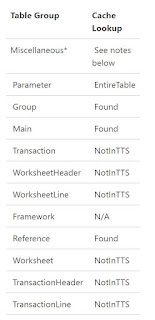
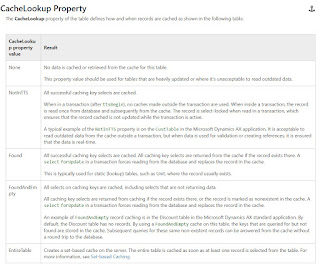
Single record caching
Found
Found caching will assign for the main table, to find the unique record, like CustTable.
Found and Empty
Similar to Found, when there is empty record can be cache, will be used for Group Tables like custGroup.
NotInTTS
Will be used for Transaction tables like CustTrans, because to avoid to cache the NotInTTS records.
Set-based caching
EntairTable
This will be used mainly for Parameter table as it contains the single record to cache full table data.
Record Caching
Microsoft Dynamics AX database record caching is a performance-enhancing feature that helps avoid database access when it's not strictly necessary. Retrieving database records from memory instead of the database significantly speeds up data access. Caching can reduce the performance penalty for repetitively accessing the same database records.
Types of Caching
Caching is transparent to the application; however, it's important to know how caching works to optimize its performance in Microsoft Dynamics AX. Following are the types of caching:
Single-record
Set-based
Single-record caching has the following characteristics:
Defined at design time
Moves records to the cache based on the table's CacheLookup property and the type of SELECT statement that is used to retrieve the record
For more information about record caching, see Single-record Caching.
Set-based caching has the following characteristics:
Defined either at design time or in X++ code
Moves sets of records to the cache
Implemented either through the table's CacheLookup property or in code by using the RecordViewCache class
Set-based Caching [AX 2012]
EntireTable Cache
When you set a table's CacheLookup property to EntireTable, all the records in the table are placed in the cache after the first select. This type of caching follows the rules of single record caching. This means that the SELECT statement WHERE clause must include equality tests on all fields of the unique index that is defined in the table's PrimaryIndex property.
The EntireTable cache is located on the server and is shared by all connections to the Application Object Server (AOS). If a select is made on the client tier to a table that is EntireTable cached, it first looks in its own cache and then searches the server-side EntireTable cache. An EntireTable cache is created for each table for a given company. If you have two selects on the same table for different companies the entire table is cached twice.
Single-record Caching [AX 2012]
Record caching is enabled for a table when all the following statements are true:
The CacheLookup property on the table is enabled by setting it to one of the following values:
NotInTTS, Found, FoundAndEmpty.
The record buffer disableCache method has not been called with a parameter of true.
Records are cached for all unique indexes when all the following criteria are met:
The table is cached by having its CacheLookup property set to NotInTTS, Found, or FoundAndEmpty.
The select statement that selects the records uses an equal operator (==) on the caching key. The fields in the where clause of the select statement match the fields in any unique index.


15 August 2017
Event handlers for table methods in Dynamics 365 / AX 7
In the below code, You can see a class which is included with one method for post event handling for ReqPO->ValidateQuantity() method.
According to the D365 concept, have to use the static method for event handler but, in this case, need to return value.
Using the below function we can return value even in a static method.
Below method is to execute after ReqPO->ValidateQuantity() method as a post event method.

Ref: Method for the above event method.
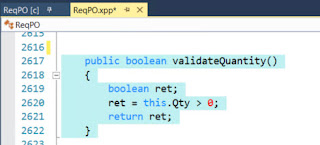
According to the D365 concept, have to use the static method for event handler but, in this case, need to return value.
Using the below function we can return value even in a static method.
Below method is to execute after ReqPO->ValidateQuantity() method as a post event method.

Ref: Method for the above event method.

02 August 2017
Customer postal address Primary address X++ code AX 2012 / Logistics postal address city, state and zip code
public LogisticsPostalAddress getPostalAddressByType(DirPartyRecId _party, LogisticsLocationRoleType _type)
{
DirPartyLocation partyLocation;
DirPartyLocationRole partyLocationRole;
LogisticsLocation location;
LogisticsLocationRole locationRole;
LogisticsPostalAddress postalAddress;
LogisticsElectronicAddress electronicAddress;
select firstonly postalAddress
exists join location
where location.RecId == postalAddress.Location
exists join locationRole
where locationRole.Type == _type
exists join partyLocation
where partyLocation.Location == location.RecId &&
partyLocation.Party == _party &&
partyLocation.IsPrimary == NoYes::Yes
exists join partyLocationRole
where partyLocationRole.PartyLocation == partyLocation.RecId &&
partyLocationRole.LocationRole == locationRole.RecId;
return postalAddress;
}
{
DirPartyLocation partyLocation;
DirPartyLocationRole partyLocationRole;
LogisticsLocation location;
LogisticsLocationRole locationRole;
LogisticsPostalAddress postalAddress;
LogisticsElectronicAddress electronicAddress;
select firstonly postalAddress
exists join location
where location.RecId == postalAddress.Location
exists join locationRole
where locationRole.Type == _type
exists join partyLocation
where partyLocation.Location == location.RecId &&
partyLocation.Party == _party &&
partyLocation.IsPrimary == NoYes::Yes
exists join partyLocationRole
where partyLocationRole.PartyLocation == partyLocation.RecId &&
partyLocationRole.LocationRole == locationRole.RecId;
return postalAddress;
}
26 June 2017
21 June 2017
Event Handlers in Dynamics AX 7 and Dynamics AX 365 - D365
If you want to create a new event handler then have to create a class and define.
Example:
How to get formRun or element in the event handler in D365
[PostHandlerFor(formStr(AssetTrans), formMethodStr(AssetTrans, init))]
public static void AssetTrans_Post_init(XppPrePostArgs args)
{
FormRun formRunElement;
FormDataSource formDataSource;
CustomTableFixedAssetProfileTmp assetProfileTmp;
QueryBuildDataSource dataSource;
formRunElement = args.getThis();
if( formRunElement.args().callerName() == formStr(HHD_FixedAssetProfile))
{
assetProfileTmp = formRunElement.args().record();// formRun calles the args which is contains the record of caller form
formDataSource = formRunElement.dataSource();
dataSource = formDataSource.query().dataSourceTable(tableNum(AssetTrans));
dataSource.addRange(fieldNum(AssetTrans,BookId)).value(assetProfileTmp.BookId);
dataSource.addRange(fieldNum(AssetTrans,AssetId)).value(assetProfileTmp.AssetId);
}
}
class VendTableHandler
{
[PostHandlerFor(tableStr(VendTable), tableMethodStr(VendTable, insert))] // Post even Handler
public static void VendTable_Post_insert(XppPrePostArgs _args)
{
VendTable vendTable = _args.getThis();
_args.setReturnValue(VendTable::exists(vendTable.AccountNum));
}
}
// For Pre event handler
// [PreHandlerFor(tableStr(VendTable), tableMethodStr(VendTable, insert))]
Note: once you created an event handler for a table method. You can see + symbol for the method left side.
Example:
How to get formRun or element in the event handler in D365
[PostHandlerFor(formStr(AssetTrans), formMethodStr(AssetTrans, init))]
public static void AssetTrans_Post_init(XppPrePostArgs args)
{
FormRun formRunElement;
FormDataSource formDataSource;
CustomTableFixedAssetProfileTmp assetProfileTmp;
QueryBuildDataSource dataSource;
formRunElement = args.getThis();
if( formRunElement.args().callerName() == formStr(HHD_FixedAssetProfile))
{
assetProfileTmp = formRunElement.args().record();// formRun calles the args which is contains the record of caller form
formDataSource = formRunElement.dataSource();
dataSource = formDataSource.query().dataSourceTable(tableNum(AssetTrans));
dataSource.addRange(fieldNum(AssetTrans,BookId)).value(assetProfileTmp.BookId);
dataSource.addRange(fieldNum(AssetTrans,AssetId)).value(assetProfileTmp.AssetId);
}
}
class VendTableHandler
{
[PostHandlerFor(tableStr(VendTable), tableMethodStr(VendTable, insert))] // Post even Handler
public static void VendTable_Post_insert(XppPrePostArgs _args)
{
VendTable vendTable = _args.getThis();
_args.setReturnValue(VendTable::exists(vendTable.AccountNum));
}
}
// For Pre event handler
// [PreHandlerFor(tableStr(VendTable), tableMethodStr(VendTable, insert))]
Note: once you created an event handler for a table method. You can see + symbol for the method left side.
Subscribe to:
Posts (Atom)